Citation Conversion and Cleanup
Citation Conversion and Cleanup automates the conversion of numbered (Vancouver) citations between different standard editorial styles for example, brackets [3], parentheses (3), and superscript numbers such as "example2". This advanced workflow will also clean up spacing and punctuation in numbered citations, and the punctuation (periods, commas, colons, and semicolons) that surround citations according to your journal requirements (for example, "citation1." to "citation.1").
Should I run Citation Conversion and Cleanup if the author uses the correct style?
Yes! Even when the author uses the correct style, this workflow performs essential cleanup of subtle, tedious formatting errors that are difficult to catch manually. For example, it ensures consistency in spacing, punctuation, and the correct use of characters like changing a hyphen to an en dash ("[1, 4-7]" to "[1, 4–7]").
Run Citation Conversion and Cleanup
To run Citation Conversion and Cleanup:
Run Orion processes (Cleanup, Styles, SmartReplace, SmartReferences) before working with Advanced Workflows.

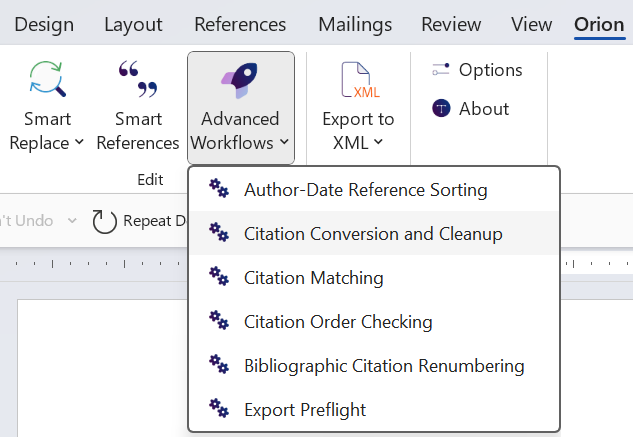
Select the Advanced Workflow tool
to open a dropdown (Word → Orion → Edit → Advanced Workflows). Orion will automatically detect the style in use.
(If applicable) Run workflows listed in the dropdown before Citation Conversion and Cleanup, for example Author-Date Reference Sorting.
Select Citation Conversion and Cleanup from the dropdown. Typefi Orion will convert numbered citation styles and standardise punctuation and spacing according to your citation style selected in Typefi Compass.
Best practice
When styling paragraphs, ensure references don't contain internal hard returns. Extra breaks interfere with bibliographic reference and citation processing.