Citation Order Checking
Citation Order Checking validates the sequential order of all your numbered citations—references (Vancouver) and objects (for example, figures, tables, and boxes)—based on the citation style selected in Orion Compass. Citation Order Checking inserts a Word comment (a query) wherever a sequential error is found.
Numbered vs. Author-Date citation order checks
Citation Order Checking workflow adjusts based on the style set in Typefi Orion Compass:
If you use:
- Numbered styles (Vancouver): Checks the order for both reference and object citations.
- Author-Date styles (Harvard): Checks the order of object citations only (figures, tables, and boxes), ignoring the order of Author-Date citations.
Run Citation Order Checking
To use Citation Order Checking:
- Run Orion processes—Cleanup, Styles, SmartReplace, SmartReferences and Advanced Workflows in the order they appear in the dropdown preceding Citation Order Checking.
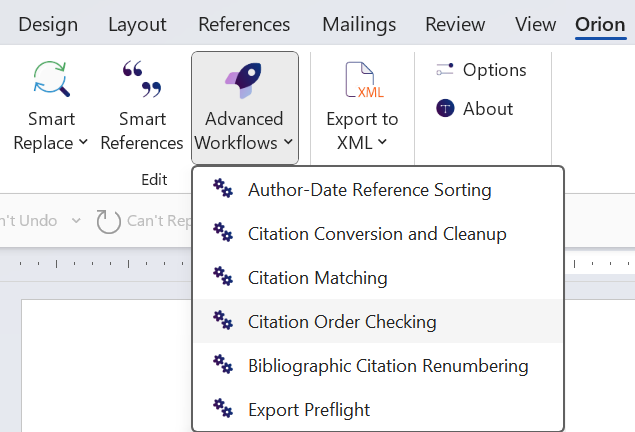
- Select the Advanced Workflow tool to open a dropdown (Word → Orion → Edit → Advanced Workflows)

- Select Citation Order Checking from the dropdown. Typefi Orion will validate the order of your numbered references according to the selected citation style and object types in the Citations tab in Orion Compass.
Note
Citation Order Checking adds a comment for each out-of-order citation. A single ordering error may generate multiple comments for all subsequent citations in the document.
Last updated: 13 Mar 2026, 22:49:49
Loading navigation...