Bibliographic Citation Renumbering
NOTE
ℹ️ Run Bibliographic Citation Renumbering only after you complete copyediting, as citation order often shifts during copyediting. Ensure you run all preceding workflows and resolve any validation issues before running Bibliographic Citation Renumbering.
Bibliographic Citation Renumbering validates and processes citation order based on the parameters you set in the Citations tab in Typefi Orion Compass.
Bibliographic Citation Renumbering automates the following:
- corrects the numbering of misplaced in-text bibliographic citations
- reassigns all reference numbers throughout the document
- sorts the references in the bibliography to match the new numbering
- verifies that each renumbered in-text citation corresponds to the correct reference
Prep
Before you start, run all Orion processes to clean and structure your document before using Advanced Workflows.
- Run the standard Typefi Orion pre-processing tools: Cleanup, Styles, SmartReplace, and SmartReferences.
- Complete all copyediting.
- Run all preceding Advanced Workflows, specifically, Citation Matching and Citation Order Checking.

- Resolve any issues reported by Citation Matching (for example, remove uncited references, add appropriate citations, or add missing references).
Style check
If you identify uncited references, manually apply the cite_bib style using Word's Styles menu.
- Review Citation Order Checking warnings before proceeding. In addition to dealing with duplicate references, you may need to distinguish between two different scenarios:
- Citations are correct, but references are not in correct order—proceed directly to Citation Renumbering to correct the order
- References are in the correct order, but incorrect references have been cited—correct the citations first; then, rerun Citation Order Checking to confirm the issue is fixed before proceeding.
Run Bibliographic Citation Renumbering
After completing all prerequisite checks, you are ready to run Bibliographic Citation Renumbering.
Follow these steps:
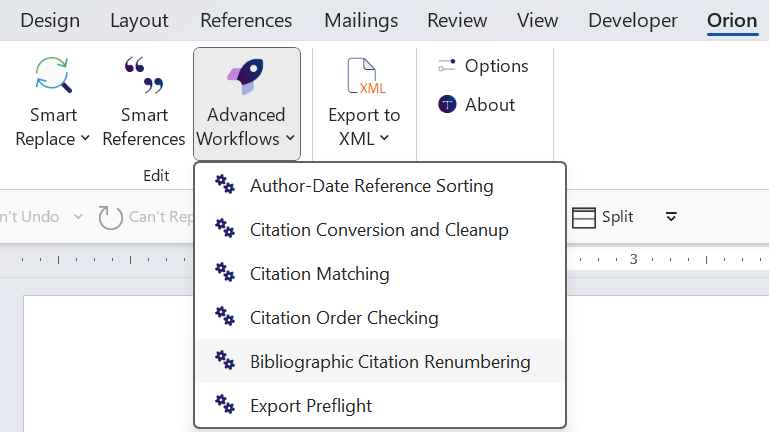
- Select the Advanced Workflow tool to open a dropdown (Word → Orion → Edit → Advanced Workflows)

- From the dropdown, select Bibliographic Citation Renumbering. Typefi Orion validates and renumbers your bibliographic citations according to the rules you set in Orion Compass.
- Once the workflow completes, review the final reference list, and confirm it correctly matches the new in-text sequencing.