Set up Advanced Workflows in Typefi Orion Compass
Note
This article is for existing eXtyles customers migrating to Typefi Orion. For Cloud environments, your Typefi team adds your Advanced Workflows on your behalf. For Workgroup and Desktop environments, your Local Administrator performs the steps in this article.
Advanced Workflows help you edit, validate, and process citations and references in your document. Each workflow addresses a specific editorial need and can be run from the Typefi Orion for Word ribbon.
Gather requirements
Before Advanced Workflows configuration begins, you'll work with your Typefi team to review your existing setup and identify which workflows your publications require. Orion 1.0 includes the following workflows:
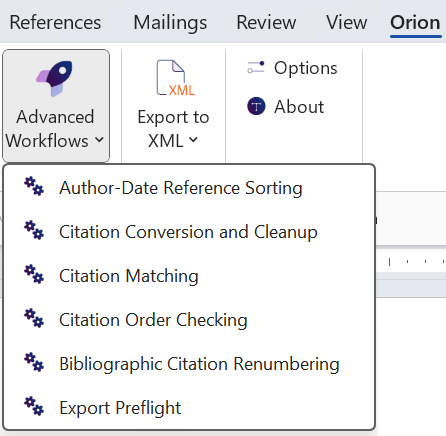
- Author-Date Reference Sorting
- Convert and Clean Citation Style
- Citation Matching
- Check Numbered Citation Order
- Bibliographic Citation Renumbering
- Export Preflight
Export Preflight covers the functionality of the eXtyles Author Processing workflow, with added processing of affiliations, keywords, abbreviations, and article history.
For a description of each workflow, see the Advanced Workflows reference guide.
Note
Additional advanced workflows are planned for future releases.
Create advanced workflows
Once the relevant Advanced Workflows are identified, your Typefi team configures them to:
- Match your current editorial behaviour
- Integrate with SmartReferences and SmartReplace
- Apply publication-specific rules where needed
Then, your Typefi team creates workflow files in Typefi Server and connects them to Orion Compass.
Coming soon
Step-by-step guidance for creating and managing Advanced Workflow files in Typefi Server for Workgroup and Desktop environments will be available soon.
Add advanced workflows to Orion Compass
At this stage, your Typefi or Local Administrator adds the configured workflows to Orion Compass.
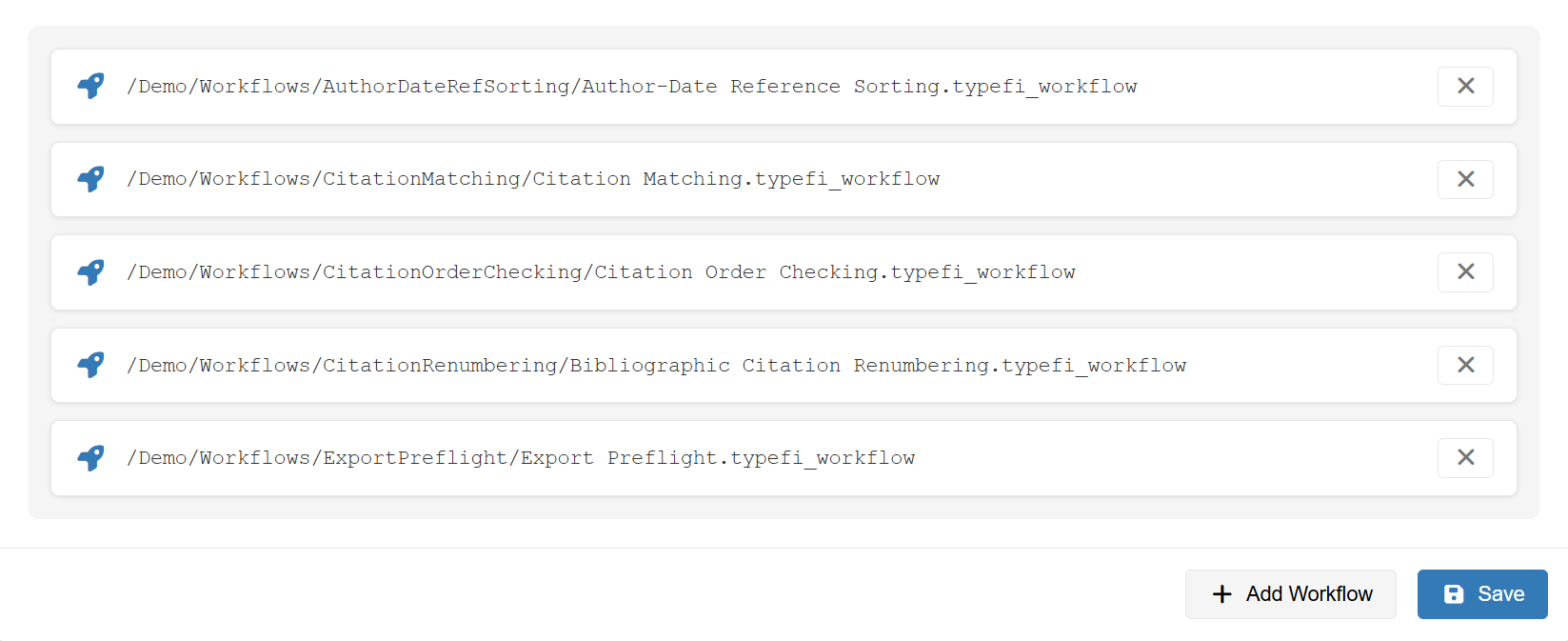
To add a workflow:
- In the Orion Compass Global Settings menu (Orion Compass → Configuration Options → Global Settings), select Advanced Workflows.
- Click Add Workflow.
- In the Choose Workflow dialog, navigate to the AdvancedWorkflows folder (for example,
/Files/Orion workflows/AdvancedWorkflows) and select a workflow. - Click Select to add the workflow.
- Click Save.
The workflows are available for use within the Typefi Orion for Word ribbon.
Validation and training
After workflows are added to Orion Compass, your Typefi team processes sample content to verify correct citation processing, ensures all publication-specific editorial rules are respected, and confirms output meets your expectations. Your editorial team is then trained to run these workflows.
Next steps
Once setup is complete, your team can start using Advanced Workflows from the Typefi Orion for Word ribbon. For guidance on using Advanced Workflows, see the Advanced Workflows reference guide.