Advanced Workflows
Advanced workflows are designed to help you edit, validate, and process citations and references in your document. This section covers the specialized, procedural tools designed for complex document processing and refinement, accessible via the Edit group of the Orion ribbon. These workflows are crucial for maintaining editorial compliance and preparing files for advanced export.
Available Advanced Workflows
The following table lists the advanced workflows. Click on the Advanced Workflow name to see step-by-step instructions.
| Advanced Workflow | Purpose |
|---|---|
| Author-Date Reference Sorting | Orders references strictly according to Author-Date style conventions. |
| Convert and Clean Numbered Citation Style | Automates the conversion of numbered citations styles (for example, Vancouver) and standardises all internal and external punctuation and spacing to align with specific journal standards. |
| Citation Matching | Reconciles in-text citations with the corresponding bibliographic reference entries. |
| Citation Order Checking | Checks in-text citation placement and chronological ordering compliance within the manuscript. |
| Bibliographic Citation Renumbering | Sorts the complete reference list based on established rules, regardless of in-text citations. |
| Export Preflight | The final automated check to ensure all required elements are present and clean before file export. |
NOTE
Additional advanced workflows are planned for future releases. Interested in an advanced workflow you don't currently use? Contact us; we're happy to help you to determine the best solution for your organisation.
Select an Advanced Workflow
You can access your organisation's available workflows in the Orion ribbon.
- Open your document in Microsoft Word.
- Select the Advanced Workflows tool to open a dropdown (Word → Orion → Edit → Advanced Workflows).

- From the dropdown, select the appropriate workflow.
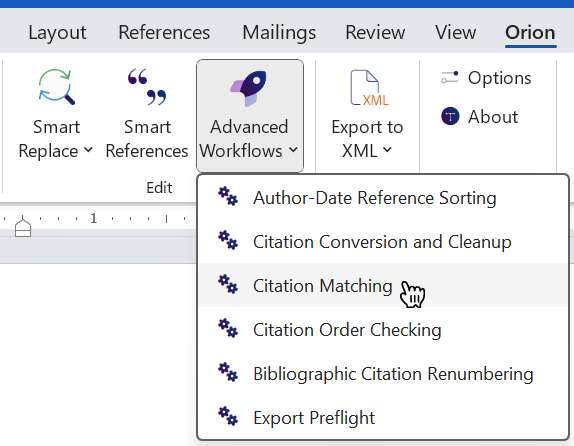
Workflows in the dropdown menu appear in the order they are added in Orion Compass.